
Interior Design Website ADA Compliance: A Complete Guide
This post covers how to know if your interior design website is ADA compliant, which items to fix first, and which popular aesthetic elements are putting your website at the most risk. We look at a few real court cases in which interior designers got in trouble for their websites' lack of compliance, and what their plaintiffs had in common. We also share the primary ways your website should be compliant and how to know if it's not.
What is Website ADA Compliance?
1 | Key compliance factors.
Your website must give people with disabilities the same “full and equal enjoyment” of your services as anyone else under Title III of the Americans with Disabilities Act. The gold-standard benchmark is WCAG 2.1 or 2.2 Level AA. The four POUR principles:
Perceivable – alt text for your project photos, captions on video tours, 4.5:1 color contrast.
Operable – everything reachable by keyboard, no seizure-inducing flashes.
Understandable – clear form labels on your consultation requests, predictable navigation.
Robust – works with screen readers and future assistive tech.
Sources: W3C WCAG 2.1 (2021) & 2.2 (2023); DOJ “Guidance on Web Accessibility and the ADA” (March 2022, still current).
2 | How compliance is determined.
No government agency “certifies” private websites. Courts decide case-by-case using WCAG AA as the measuring stick (explicitly endorsed by the DOJ). If a blind visitor using a screen reader can’t browse your portfolio, read your services, or submit an inquiry, you lose. An accessibility statement plus a remediation plan helps your defense.
Sources: ada.gov/resources/web-guidance; 2025 federal court decisions.
3 | Why ADA website compliance became more important over 2025.
ADA website lawsuits exploded in 2025: over 2,014 cases in the first half alone (37% increase year-over-year). Small service businesses like yours were hit hard. Plaintiffs use automated tools to scan thousands of sites daily; most cases settle fast for $5k–$25k plus fixes. Your website is a prime target because it offers “goods and services” (viewing work, booking consultations).
Sources: EcomBack 2025 Mid-Year ADA Report (July 2025); UsableNet/Accessible.org 2025 trackers; DarrowEverett & NK Legal 2025 analyses.
Real Lawsuits Filed Against Interior Design Websites
1. The Cases
Case 1 – Justin Bullock v. Pure Salt Interiors, Inc. (S.D.N.Y., filed Dec 14, 2022).
Pure Salt Interiors – high-end design studio with a gorgeous online portfolio and shop. The plaintiff (visually impaired) said the site wasn’t screen-reader friendly. Settled quickly.
Case 2 – Sophia Faldonie v. Boston Interiors Home Furnishings, LLC (D. Mass., filed July 30, 2025, 1:25-cv-12128).
Boston Interiors provides full interior design services across New England. Same story: inaccessible website alleged. Notice of settlement filed shortly after.
Sources: accessibility.com lawsuit database; Barclay Damon alerts 2025.
2. The Plaintiffs
About 50% of all 2025 filings came from just 31 serial plaintiffs. These are almost always legally blind “testers” who visit your site solely to run screen readers (JAWS/NVDA) and document failures.
The plaintiff against Pure Salt filed dozens of suits 2022–2025.
The plaintiff against Boston Interiors filed at least 26 suits in July–Dec 2025 alone.
3. Similarities you’ll see in nearly every website ADA non-compliance lawsuit:
Templated complaints listing the same 10–15 WCAG errors
Filed in plaintiff-friendly districts
Represented by the same small group of law firms
Over 95% of cases settle without trial
Sources: EcomBack 2025 Mid-Year Report; Barclay Damon 2025 tracking.
How to Check Your Interior Design Website’s ADA Compliance
1 | Top 3 best free tools for checking ADA compliance
WAVE by WebAIM (wave.webaim.org or Chrome extension) – shows errors overlaid on your live pages.
axe DevTools (free Chrome/Firefox extension by Deque) – deepest audit with fix suggestions.
Google Lighthouse (Chrome DevTools → Lighthouse → Accessibility) – gives you a 0–100 score.
Run them on your home, services, portfolio, and contact pages.
Sources: W3C Web Accessibility Evaluation Tools List; WebAIM, Deque, and Google documentation (2025).
2 | Low website ADA compliance score? Fix these items first.
These issues cause most ADA non-compliance lawsuits and should be addressed first:
Missing or useless alt text on your project photos
Keyboard navigation failures
Low color contrast
Unlabeled contact/booking forms
No captions on video tours
You could also test manually: Go through your website with a free NVDA screen reader.
3 | How often should website ADA compliance be re-checked?
After every major update (new photos, page redesign / addition, new booking calendar). Automated scans: monthly. Full manual + automated audit: every 4–6 months minimum.
Best practice for you to consider: conduct quarterly compliance reviews + post an accessibility statement with a feedback email.
Sources: BOIA.org & Accessible.org 2025 guidance.
Beautiful but Risky: Common Aesthetic Website Design Elements that Often Violate ADA Rules
As an interior designer, your website should be beautiful. Unfortunately, many of the exact design choices that make your site gorgeous are the ones that create real barriers for people with disabilities and get flagged in lawsuits.
Here are the seven most common “pretty” elements you’ll recognize on almost every luxury/minimalist interior design site—and why they fail WCAG:
Low Color Contrast Text & UI Elements (the #1 issue): You love soft light-gray text (#999 or lighter), subtle earth tones, or thin elegant fonts on white/cream backgrounds. Why it fails: WCAG 1.4.3 requires 4.5:1 contrast for normal text. Found on 79.1% of the top 1 million homepages.
Text Overlaid Directly on Banner Images: Full-screen images of your beautifully staged rooms with white or light text layered right on top (no solid overlay or darkening). Why it fails: Contrast drops below the threshold in different areas of the photo.
Portfolio Images & Galleries with Missing or Generic Alt Text: Gorgeous before/after shots, mood boards, and project grids labeled only “img_347.jpg” or left blank. Why it fails: WCAG 1.1.1. Missing alt text appears on 55.5% of top homepages.
Auto-Advancing Carousels or Sliders: Homepage sliders that automatically rotate through 4–6 stunning project photos. Why it fails: WCAG 2.2.2 (Pause, Stop, Hide) plus keyboard/screen-reader problems.
Hover-Only Interactions & Micro-Animations: Project cards that reveal details or zoom only when someone hovers with a mouse. Why it fails: WCAG 1.4.13 – content must be available to keyboard and touch users too.
Invisible or Removed Keyboard Focus Indicators: Stripping the outline that appears around links/buttons “because it looks cleaner” when "tabbing" through your site with the tab button instead of a mouse, touchpad, or touchscreen. Why it fails: WCAG 2.4.7 Focus Visible.
Very Thin or Decorative Typography: Font-weight 200–300 headings or script fonts, tiny body text. Why it fails: Reduces readability for low-vision users (violates perceivable requirements).
These elements are not banned—you can keep the exact same luxurious look with small fixes (slightly darker hero overlays, descriptive alt text that actually helps SEO, pause buttons, visible focus rings, etc.). But left in their raw “aesthetic-first” form, they are exactly what plaintiffs’ tools flag first.
Sources: WebAIM Million 2025 Report (published March 31, 2025 – official data on 1 million homepages); WCAG 2.2 Quick Reference; Deque Systems & BOIA 2025 reports.
Example Website Compliance Statement for Interior Design Websites
Here is an example compliance statement that you can adapt and use on your own website:
Accessibility Statement
At Your Business Name, we are committed to ensuring that our website is accessible to all individuals, including those with disabilities.
Our website has been designed and reviewed in accordance with the Web Content Accessibility Guidelines (WCAG) 2.1, Level AA. We’ve taken the following steps to enhance accessibility and user experience across all devices:
Structured, clear heading hierarchies throughout the site
Descriptive alternative (alt) text for all meaningful images
Logical, consistent content order for screen reader navigation
Defined site language to support assistive tools
Accessible color contrasts for readability
Minimal use of motion and animation
Compatibility with major screen readers and keyboard navigation
Video and downloadable content with accessibility compliance
Regular accessibility audits using industry-standard tools
Feedback
We are continually improving the accessibility of our website. If you encounter any barriers, we welcome your feedback. Please contact us at you@youremail.com and we'll reply promptly.
How Squarespace Helps Interior Designers with ADA Compliance
As a marketing agency that has designed around 200 custom websites, we adore Squarespace. Squarespace does give you a solid accessibility head start compared to many other builders. However, Squarespace does NOT make your site automatically ADA compliant or fully WCAG 2.1/2.2 AA conformant. Your final design choices (those gorgeous low-contrast hero images, thin fonts, auto-playing sliders, etc.) can still create barriers.
Here’s exactly what Squarespace provides to help you get closer to compliance:
Dedicated alt-text fields on every image: You literally cannot upload a portfolio photo without seeing the alt-text box. Their built-in SEO Report even flags missing alt text so you catch it before launch.
Automatic keyboard navigation support: Every Squarespace site gets visible focus outlines (the blue ring when someone tabs) and a “Skip to Content” link that appears automatically. You don’t have to code this yourself.
Proper semantic HTML structure: Headings, sections, and navigation blocks automatically use correct HTML and ARIA landmarks — screen readers can actually understand the layout of your homepage and portfolio pages.
Color contrast controls in the editor: The Colors panel shows you live contrast ratios so you can adjust your signature soft-gray text or earth-tone palettes to meet the 4.5:1 WCAG minimum without touching CSS.
Accessible media options: Easy fields to add captions to video tours and transcripts to audio files. You can also turn off auto-play on carousels and add pause controls.
Labeled forms and checkout: Contact/booking forms and commerce checkout fields are properly labeled by default — huge help for screen-reader users filling out your consultation requests.
Sources (current as of Feb 2026)
Squarespace Accessibility & Compliance page: https://www.squarespace.com/accessibility
Accessibility Resources at Squarespace (updated Oct 15, 2025): https://support.squarespace.com/hc/en-us/articles/215129127-Accessibility-resources-at-Squarespace
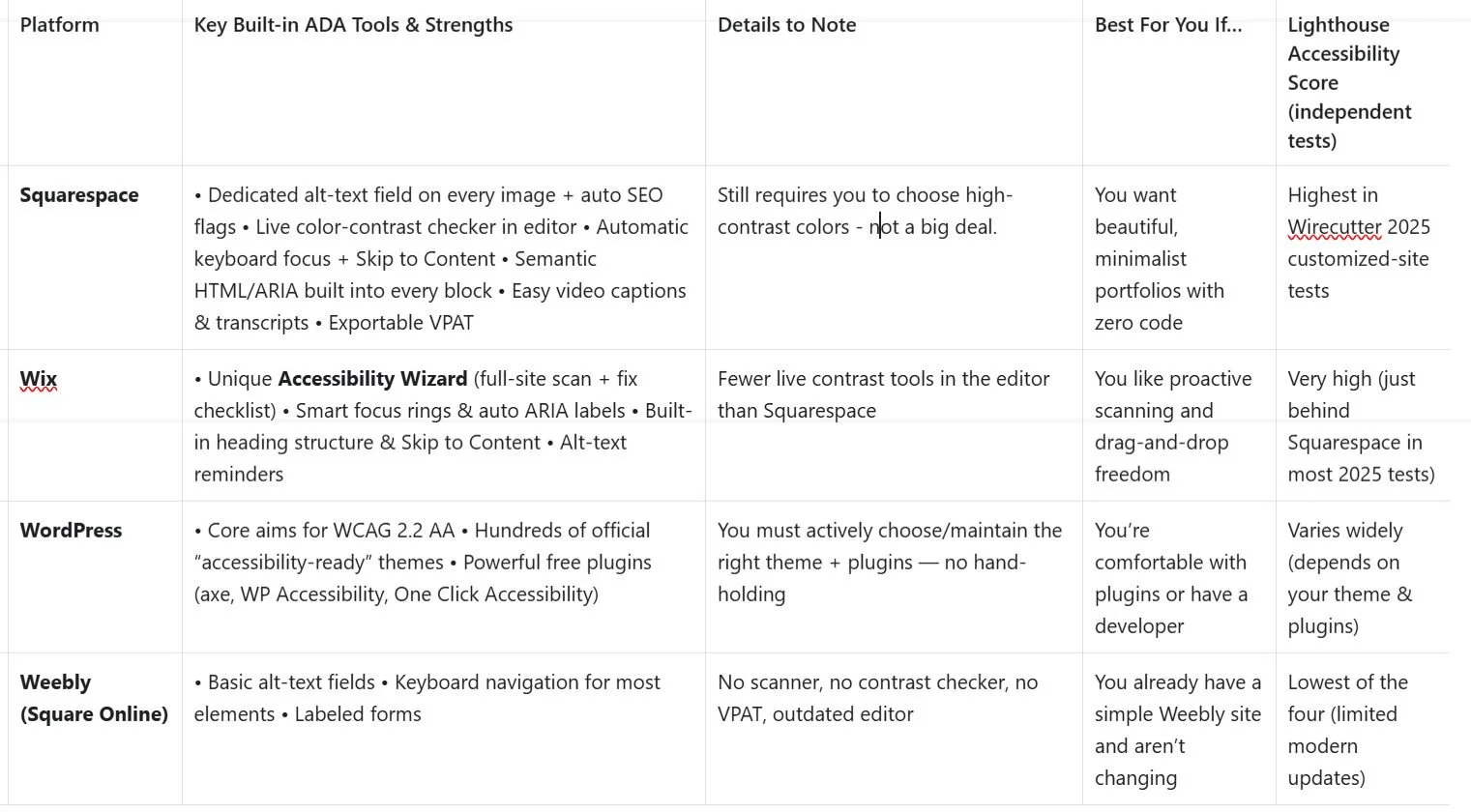
Which Website Platforms are the Most ADA Compliant? Here is Comparison Chart.
Need a more compliant design website?
If you are ready for your ADA-friendly, SEO and AIO-powered website, Go here.
